How to create coupon codes for your store
Written by the ZipToSale team · Published November 10, 2026 · Last updated November 13, 2026
A coupon is a code you give buyers. They type it at checkout and the discount comes off their order from your store, as its own line on the order and the invoice. You decide what it takes off, which lots it covers, when it expires and how often it can be used. This guide goes through the coupon editor one section at a time, then shows what the buyer sees.
Before you start, have these to hand:
- An approved seller account (how to create one) with at least one live lot (how to list one).
- The code you want buyers to type, and what it should do.
Two things to know up front. A code works on orders from your store only, so your codes never clash with another seller's: two stores can both run a code called WELCOME10 without either noticing. And coupons apply at checkout at the listed price; they don't apply to offers.
1. Open Coupons
In the seller area, open Coupons in the menu and click New coupon.

A store can hold a limited number of coupons at once, counting disabled and expired ones. When you reach it, archive a code you no longer use to make room.
2. The code and the discount
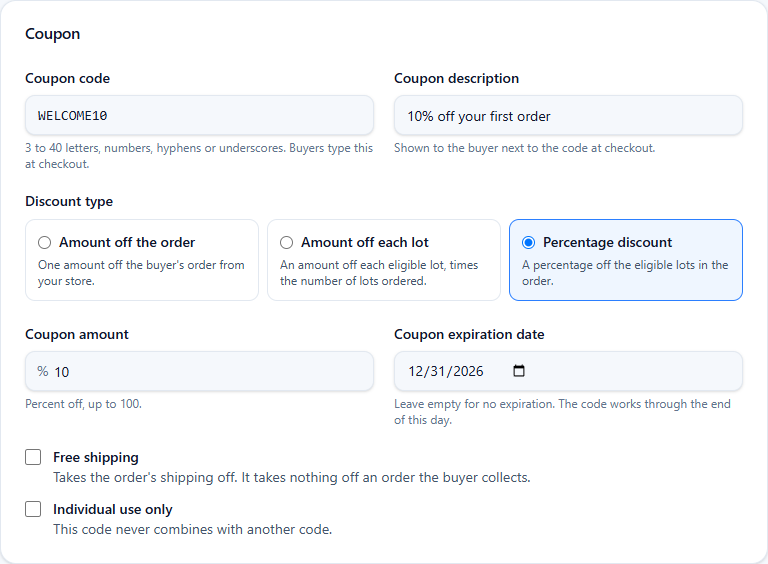
- Coupon code. Letters, numbers, hyphens or underscores. Buyers type it, so keep it short and easy to read out: WELCOME10, PALLET50, SPRING. It is saved in capitals and buyers can type it either way.
- Coupon description. One line the buyer sees next to the code at checkout, such as "10% off your first order". Say what the code does, not who it's for.
- Discount type. Three kinds:
- Amount off the order. One amount off the buyer's order from your store, such as $50. It never takes off more than the lots come to; shipping stays.
- Amount off each lot. An amount off every eligible lot, times the number of lots ordered. $25 off each lot on an order of three lots is $75.
- Percentage discount. A percentage off the eligible lots in the order, rounded down to the cent. Shipping is not discounted unless the code also grants free shipping.
- Coupon amount. Dollars, or percent for a percentage code.
- Coupon expiration date. Optional. The code works through the end of that day; leave it empty for no expiration. An expired code stays on your list so you can set a new date later.
- Free shipping. Takes the order's shipping off, on top of any amount above. It takes nothing off an order the buyer collects, because a collected order has no shipping.
- Individual use only. This code never combines with another. A buyer who enters it on top of another code is told it can't be combined, and the other code stays.
Without any restriction or limit, that's a complete coupon. Click Create coupon and it's live at once.
3. Usage restrictions
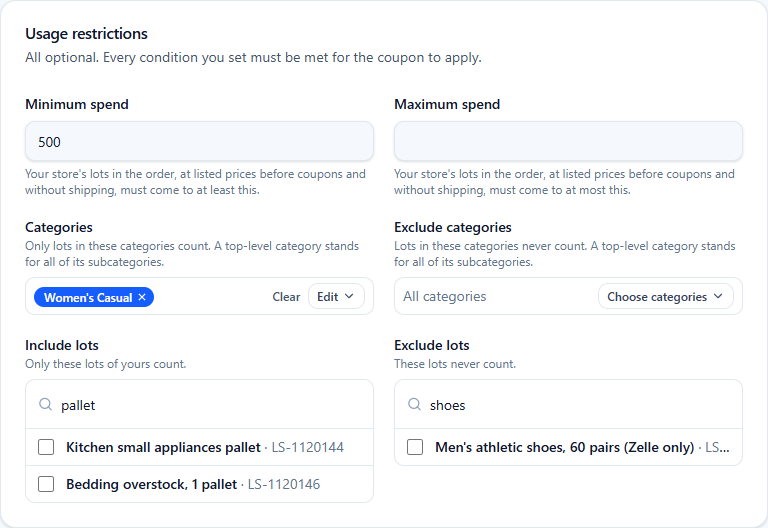
Every condition you set here must be met for the code to apply, so set only what you need.
- Minimum spend and maximum spend. Measured on your store's lots in the order at their listed prices, before any coupon and without shipping. "Minimum spend 500" means the lots must come to $500 or more. A maximum is for codes meant for small orders.
- Categories. Only lots in these categories count toward the discount. Ticking a top-level category covers all of its subcategories. In the screenshot the code applies to Women's Casual lots only; a $1,000 order with one Women's Casual lot at $300 gets 10% of $300.
- Exclude categories. Lots in these categories never count, whatever else is set.
- Include lots and Exclude lots. The same two rules, lot by lot. Search by title or lot number. A code limited to one lot is the usual way to move a single slow pallet.
Where the restrictions leave no eligible lot in the order, the buyer is told the code doesn't apply to these lots. You never have to explain the rule yourself: the message names the reason.
4. Usage limits
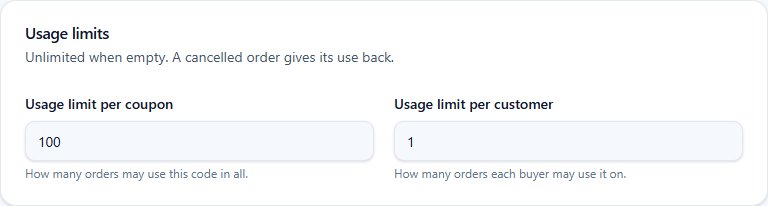
- Usage limit per coupon. How many orders may use the code in all. The Coupons page shows the count against it.
- Usage limit per customer. How many orders each buyer may use it on. One is the setting for a first-order code.
A use is an order that carries the code and was not cancelled. A cancelled order gives its use back, so a buyer who cancels can use a one-per-customer code again.
5. What the buyer sees
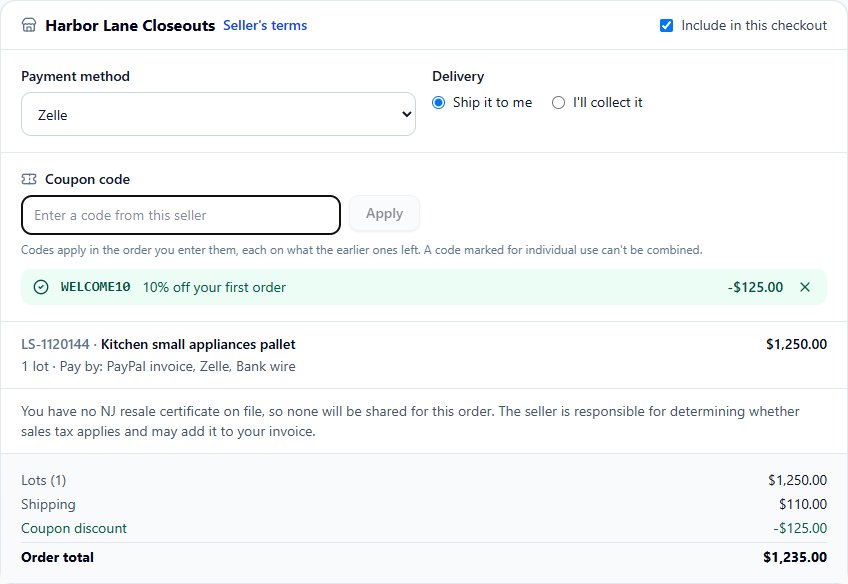
At checkout each seller's lots make one order, and each order has its own Coupon code field. The buyer enters your code and the page shows the description, the amount it took off, and the order total from the server. A code that doesn't apply is shown with the reason (expired, not for these lots, below the minimum spend, already used, can't be combined) and the rest of the checkout carries on.
Buyers can enter more than one of your codes on the same order. Codes apply in the order they are entered, each on what the earlier ones left, so a $50 code followed by a 10% code takes 10% of the remainder. An individual-use code refuses to join that list.
6. After the order
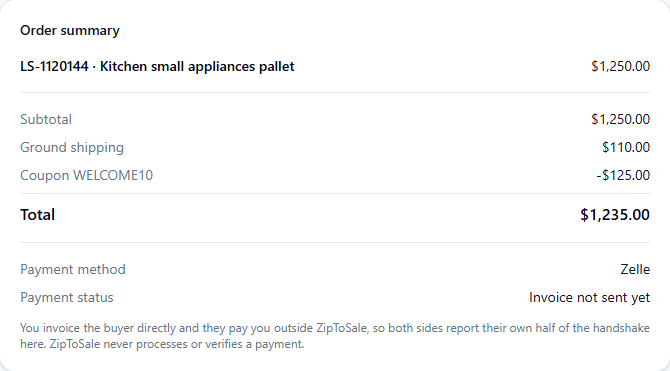
The order keeps the coupon as its own line between the shipping and any invoice adjustments, on your order page, the buyer's and the invoice emails. The lot prices on the order stay the listed prices, so the discount is always visible as what it was. Your saved payment link is filled in with the discounted total.
Because the coupon is already on the order, don't add it again as an invoice discount. The adjustments on the invoice are for fees, sales tax and discounts agreed after the order.
7. Managing your codes
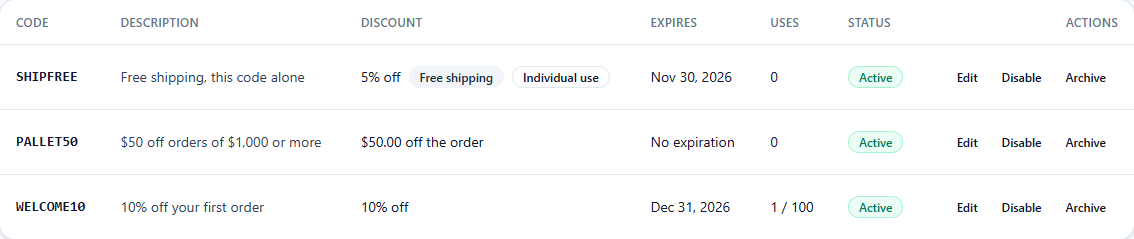
- Edit changes anything about a code, the amount included. Orders already placed keep the discount they got.
- Disable stops a code at once without losing its settings; Enable brings it back.
- Archive retires it. The code is freed for a new coupon, the row moves to the Archived view, and every order that used it is unchanged.
- Uses counts the orders that used the code and were not cancelled, against the limit if you set one.
Admins can see your coupons but never change them.
Three codes to start with
- A first-order code. Percentage discount, usage limit per customer of one, an expiry at the end of the quarter. Put it in your store's About text.
- A volume code. Amount off the order with a minimum spend, no expiry. It rewards the buyers who fill a truck.
- A clearance code. Amount off each lot, limited by Include lots to the pallets you want gone, individual use so it doesn't stack with the others.
Every code is on your store's orders only, never on another seller's, and never on an offer. The rest of selling is on Sell on ZipToSale.